




nedukkalapoovan
கருத்துக்கள உறவுகள்
-
Joined
Everything posted by nedukkalapoovan
-
இயற்கை இன்றேல் இறப்பு. இயற்கை அழகும் சிறப்பும் வாழ்வும் ஆகும்.
-

From the album: அழகிய இயற்கை
© Inuvaijur Mayuran-FB
-
மாடு வளர்ப்பை அரசு தொழிலாக்குவேன் என்ற சீமானை மாட்டுப்பயல் என்றவங்க.. இப்ப மாடுகளை கொண்டாடும் சுவிஸை என்னென்னு திட்டுவாங்க..??!
-
தமிழீழ படைப்பிரிவுச் சீருடைகள் - விக்கிபீடியா.
From the album: அழகிய இயற்கை
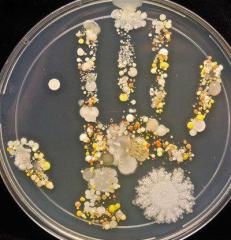
கையில் இருக்கும் நுண்ணங்கிகளின் பரம்பல். Microbiologist, Tasha Sturm, took a handprint of her son after playing outside and incubated the results.© Microbiologist, Tasha Sturm and RSB

From the album: அழகிய இயற்கை
நோர்வே நாட்டில் இருக்கும்..இந்த விடுதிக்கும் ஈழத்தமிழர்களுக்கும் தொடர்பிருப்பதாகச் சொல்லப்படுகிறது. உங்களால் அது எந்தத் தொடர்பென்று ஊகிக்க முடிகிறதா..??!© பட உரிமம்: நெடுக்ஸ்/யாழ் இணையம்

From the album: அழகிய இயற்கை
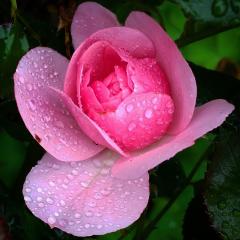
எல்லா உயிர்க்கும் இந்தப் பூமியில் தாம் விரும்பிய வடிவில் சுதந்திரமாக வாழ உரிமை உண்டு. அது தமிழருக்கும் உண்டு. அவர்களை ஆக்கிரமிப்புக்குள் வைக்க எவருக்கும் தகுதியில்லை.© பிரதியாக்க உரிமம்: நெடுக்ஸ்/யாழ் இணையம்

From the album: அழகிய இயற்கை
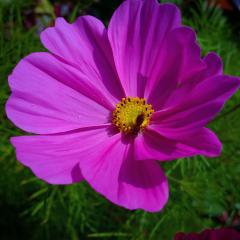
மலருக்குள் இவர் உணவுக்கா.. நிழலுக்கா பதுங்குகிறார். மலருக்குள் இவர்.. பதுங்குவதால்.. மகரந்தத்தை காவித் தூவி தானும் வாழ்கிறார்.. மலரையும் வாழ வைக்கிறார்.. நம்மையும் வாழ விடுகிறார். இந்த மலர்நாடியை நாம் பூச்சிநாசினிகளால் கொல்லலாமா...??! கூடாது.© மீள்பிரசுர உரிமம்: நெடுக்ஸ்/யாழ் இணையம்
From the album: அழகிய இயற்கை
இயற்கையில்.. உயிர்கள் எல்லாத்திற்கும் அவற்றிடையே ஒரு தொடர்பியக்கம் உள்ளது. ஒரு உயிரினம் அழிந்தாலும்.. அதன் பாதிப்பு இயற்கையை குழப்பும்.© மீள்பிரசுர உரிமம்: நெடுக்ஸ்/யாழ் இணையம்

From the album: அழகிய இயற்கை
இது கூட அருகி வரும் காட்சி ஆகிவிட்டது. 1 மில்லியன் உயிரினங்கள்.. தாவரங்கள் விலங்குகள்.. அழியும் நிலைக்கு மனிதனால்.. பூமியில் தள்ளப்பட்டுள்ளன. https://www.bbc.co.uk/news/science-environment-48133143© மீள்பிரசுர உரிமம் - நெடுக்ஸ்/யாழ்
From the album: மக்கள்
தமிழ் மக்கள் மீது முஸ்லீம் காடைகள் கட்டவிழ்த்து விட்ட கொடுமைகள்.. 1990 இல் இருந்தே ஆரம்பமாகி விட்டது. இன்னும் தொடர்கிறது.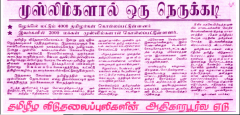
From the album: மக்கள்
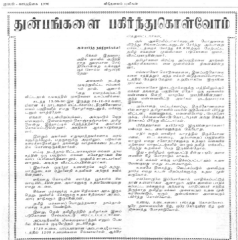
முஸ்லீம்கள் தமிழ் மக்கள் மீது கட்டவிழ்த்துவிட்ட கொடுமைகளால்.. 2000 தமிழ் மக்கள் கொல்லப்பட்டு 4 இலட்சம் பேர் அகதிகளாக்கப்பட்டுள்ளனர். பல பெண்கள் முஸ்லிம் காடைகளால் பாலியல் வல்லுறவுக்கு உள்ளாகி உள்ளனர். இவை நடந்தது 1990 களில். மேலும் தொடரும் செய்தி இங்கு.. http://pulikalinkuralradio.com/uploads/idhalgal/V_P_18.pdf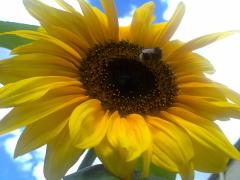
From the album: மக்கள்
சூரியக்காந்தி.. குளிர் நாட்டிலும் பூக்கும்.
From the album: மக்கள்
இதுவே இலங்கை முஸ்லீம்களின் உண்மைத் தோற்றம். நிகாப்.. புர்க்கா எல்லாம் வலிந்து திணிக்கப்பட்ட அராபிய அடையாளங்கள்.வங்கத்தில் சாமிக்கு படையல். (புனிதம் என்பது அவரவர் எண்ண ஓட்டத்தின் பிரதிபலிப்பே.) படம்: நன்றி முகநூல்.முப்பை.. ஏழ்மையும்.. செல்வந்தமும்.. ஒரே நோக்கில். https://www.bbc.co.uk/news/in-pictures-45257901இலையென்றால் உதிரத்தான் செய்யும் கட்டுமரமென்றால் கவிழத்தான் செய்யும்.அண்டையவர் சாவில் வருந்தாது மானாட்டி மயிலாடி மகிழ்ந்தவ போ போ.உலக வரலாற்றைப் பார்த்தீங்கன்னா.. தங்களின்.. தங்களின் மண் விடுதலைக்காக வீழ்ந்தவர்களை.. நிந்திப்பது கிடையாது.. போற்றுவதையே காண்கிறோம்.. அவர்களின் தவறுகளை எல்லாம் மறந்து. ஆனால்.. தமிழர்கள் பலரிடம் உள்ள கெட்ட குணம்... தங்களுக்காக மடிந்தவனையே.. விமர்சனம் என்ற போர்வையில்.. வரலாறு எழுதிறன் என்ற போர்வையில்.. வியாபாரமாக்குவதும்.. வீணடிப்பதுமாகும். அதை எல்லாம் தாண்டி.. என்றும் அநேக மக்களின் மனங்களில் வாழும் இயல்புடையோர் யார் என்று பார்த்தால்.. அது களத்தில் மக்கள்.. மண்ணுக்காய் உயிர் தந்த போராளிகளே. இன்று கரும்புலிகள் நாள். கப்டன் மில்லரின் மற்றும் அவர் பாதையில் பயணித்த அனைத்து போராளிகளுக்குமான நினைவு கூறல். !!?ஹிந்தியாவில் தொடரூந்துப் பயணக் காட்சிகள்.............. நன்றி http://www.bbc.co.uk/news/world-asia-india-41304803


Important Information
By using this site, you agree to our Terms of Use.
Account
Navigation
Search
Configure browser push notifications
Chrome (Android)
- Tap the lock icon next to the address bar.
- Tap Permissions → Notifications.
- Adjust your preference.
Chrome (Desktop)
- Click the padlock icon in the address bar.
- Select Site settings.
- Find Notifications and adjust your preference.
Safari (iOS 16.4+)
- Ensure the site is installed via Add to Home Screen.
- Open Settings App → Notifications.
- Find your app name and adjust your preference.
Safari (macOS)
- Go to Safari → Preferences.
- Click the Websites tab.
- Select Notifications in the sidebar.
- Find this website and adjust your preference.
Edge (Android)
- Tap the lock icon next to the address bar.
- Tap Permissions.
- Find Notifications and adjust your preference.
Edge (Desktop)
- Click the padlock icon in the address bar.
- Click Permissions for this site.
- Find Notifications and adjust your preference.
Firefox (Android)
- Go to Settings → Site permissions.
- Tap Notifications.
- Find this site in the list and adjust your preference.
Firefox (Desktop)
- Open Firefox Settings.
- Search for Notifications.
- Find this site in the list and adjust your preference.